





Every sale at your grocery store leaves behind useful information.
Maybe a customer loads up on produce before a holiday weekend, or a specialty item sells out three days in a row while a refrigerated product sits untouched until its expiration date. Each moment shows you how shoppers spend and where money slips through the cracks.
Store owners collect this information every day, yet many never put it to work. When you track the right numbers and review them regularly, you can stock with more confidence, cut waste, see which categories earn their keep, and catch sales trends before they cut into your profit.
You don't need a background in analytics to read your own data. Most grocery point of sale (POS) systems already track sales activity, inventory movement, purchasing patterns, and product performance. The real challenge is knowing which reports deserve your attention and what to do once you've read them.
This guide covers the basics of grocery store data analytics and the metrics worth watching, then shares nine practical ways to turn everyday store data into stronger sales and healthier profits.
Grocery Store Data Analytics 101
Before we get into specific metrics — your key performance indicators (KPIs) — and real-world examples, let's talk basics.
Grocery store data analytics is the art of collecting and interpreting the data your operations generate every day. This includes everything from your transactions and inventory movement to product popularity and pricing history.
This data can help you:
- Make better decisions by trading hunches for a clear picture of what's happening in your store.
- Respond faster to change by spotting shifts in customer buying habits and adjusting your strategy accordingly.
- Protect your profit by uncovering opportunities to improve pricing, promotions, inventory levels, and more.
That last point matters more in grocery than in almost any other retail category. The average net profit for food retailers is about 2.1% of sales, so there's little room to get it wrong. Small decisions about pricing and inventory can add up quickly, and having the right data helps you make those choices with confidence.
Your data only pays off when your POS puts it to work, instead of letting it pile up unused. Your grocery POS should track sales and inventory in real time and help you spot important trends, like unexpected shrinkage, products that need restocking, and categories gaining momentum.
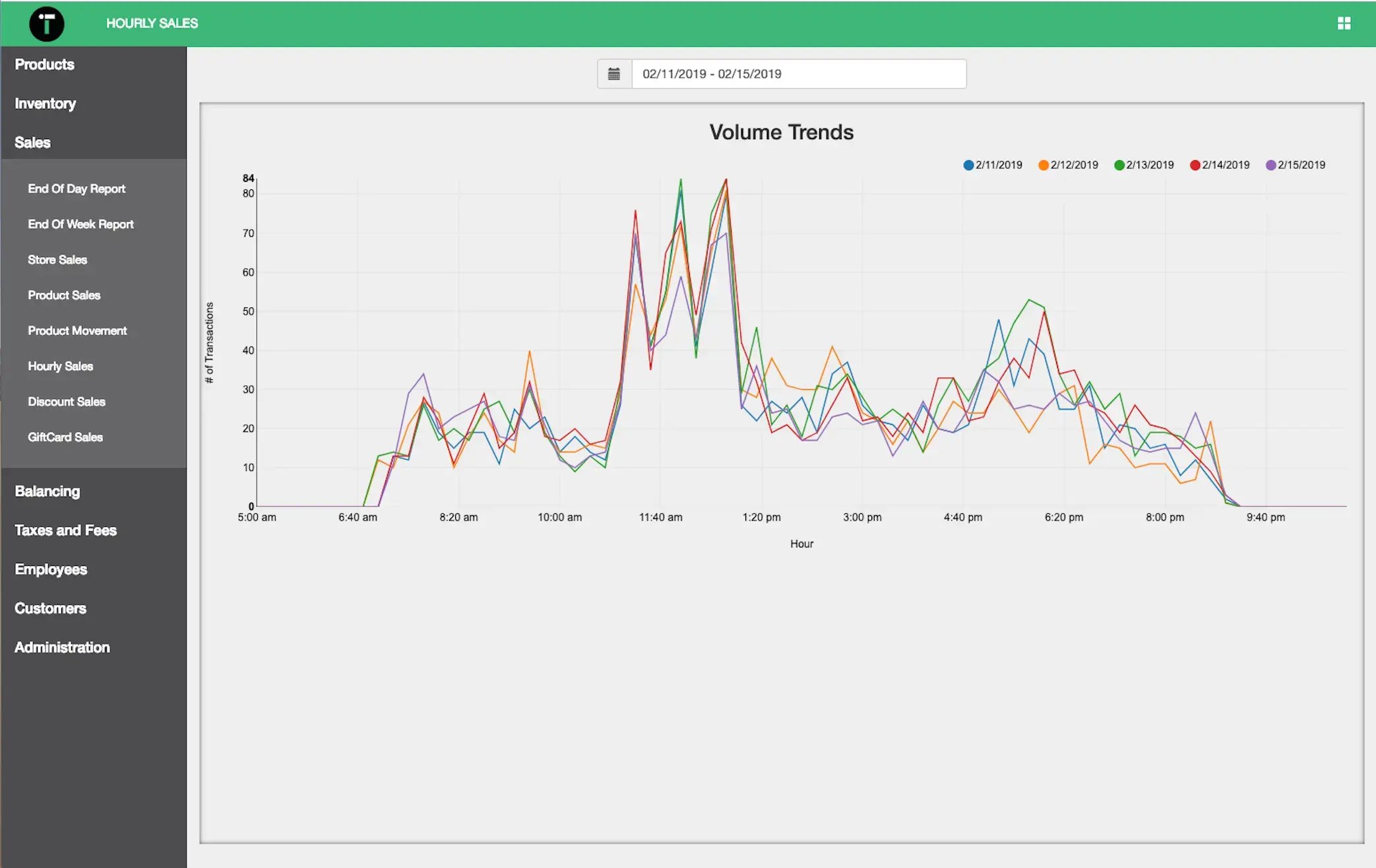
IT Retail's dashboard keeps sales and low-stock alerts in front of you throughout the day — no waiting for an end-of-day export.
Related Read: The Best Grocery Store POS System in 2026: 6 Top Providers
Now that you know the why and how behind grocery store data analytics, let's get into nine specific metrics and reports worth tracking — and how to put each one to work in your store.
1. Become an Inventory Management Pro
Managing inventory is one of the toughest parts of the job. Order too much, and you're left discounting or throwing away products that don't sell. Order too little, and shoppers may leave empty-handed and shop at another store instead.
Keeping an eye on your inventory data helps you strike the right balance. Here are a few metrics worth tracking:
- Inventory turnover rate shows how quickly products move off your shelves, helping you identify fast sellers and slow movers.
- Shrinkage rate measures losses from spoilage, theft, damaged goods, and inventory errors, giving you a clearer picture of where profits are slipping away.
- Stockout rate highlights which products sell out most often and how frequently customers encounter empty shelves.
- Days of inventory on hand (days of supply) shows how long your current stock will last, helping you time reorder decisions more effectively.
- Demand forecasting uses historical sales patterns to estimate future demand so you can stock appropriately without tying up cash in excess inventory.
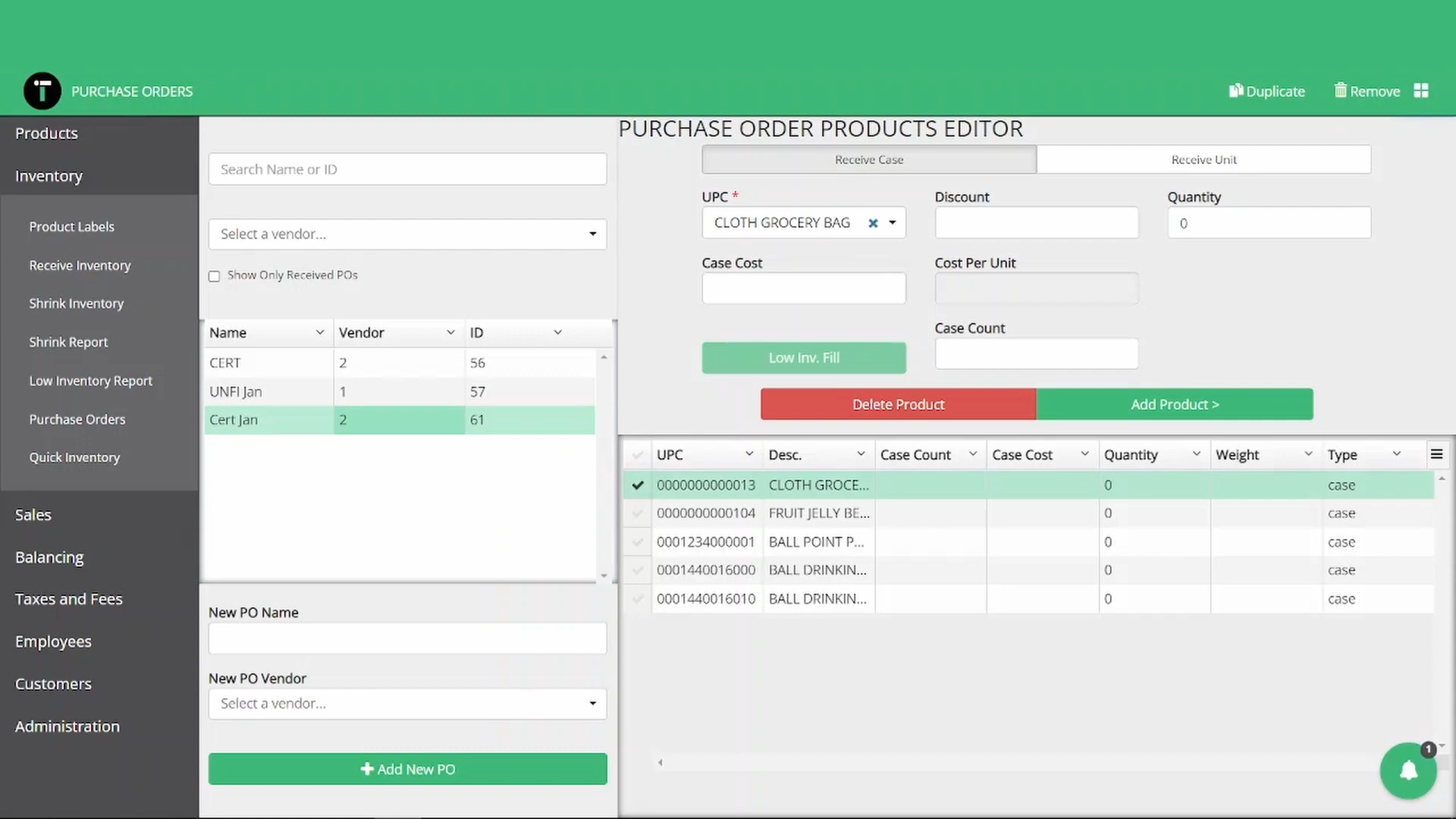
Build and send purchase orders inside IT Retail, straight off your low-stock report — and reorder without leaving the system.
Let's see what that looks like in practice. Suppose organic tomatoes sell quickly and regularly go out of stock, while conventional tomatoes sit on the shelf longer and generate more waste.
This pattern suggests shoppers are showing a stronger preference for organic options. You might decide to carry less conventional products and give organic tomatoes more shelf space, then adjust your ordering.
Instead of relying on instinct alone, you're using real sales and inventory data to guide your decisions. The more consistently you track these metrics, the easier it becomes to catch trends and fine-tune your ordering, so the right products stay on the shelf without cash sunk into the ones that aren't moving.
2. Catch Shrinkage Before It Adds Up
Shrinkage is one of the biggest drains on a grocery store's profit, and it rarely comes from one place. Some of it is spoilage and waste, some is theft or a register mistake — and each calls for a different fix.
Your data helps you tell them apart:
- Shrinkage rate by department shows where the losses cluster. A produce aisle bleeding profit to spoilage needs a different fix than a health-and-beauty aisle losing product to theft.
- Void and return rates by cashier and by hour show whether a pattern lines up with one person or one shift, so you know where to look closer.
- Cash over/short flags the drawers that don't reconcile, so you can tell an honest mistake from something worth a harder look.
Because every team member rings up under their own secure login, each void and refund ties back to whoever handled it — so a discrepancy points you straight to where it started. Pair that with built-in shrink tracking, and you catch a problem while it's small instead of finding it at your year-end count.
3. Spot Trends in Customer Behavior
Customer shopping behavior follows clear patterns, and grocery store data analytics help you spot those patterns and act on them.
Here are the customer-behavior KPIs you should know:
- Average transaction value (ATV) is the average dollar amount customers spend per visit.
- Average basket size shows how many items they generally buy per trip.
- Peak sales times reveal when your store is busiest and when it quiets down.
- Category and product performance show which product types and specific SKUs customers like most.
- Basket makeup metrics help you spot complementary products people often buy together, like pasta and sauce.
- RFM scoring (recency, frequency, monetary value) ranks customers by how recently and often they shop and how much they spend — the base of any good loyalty or marketing effort.
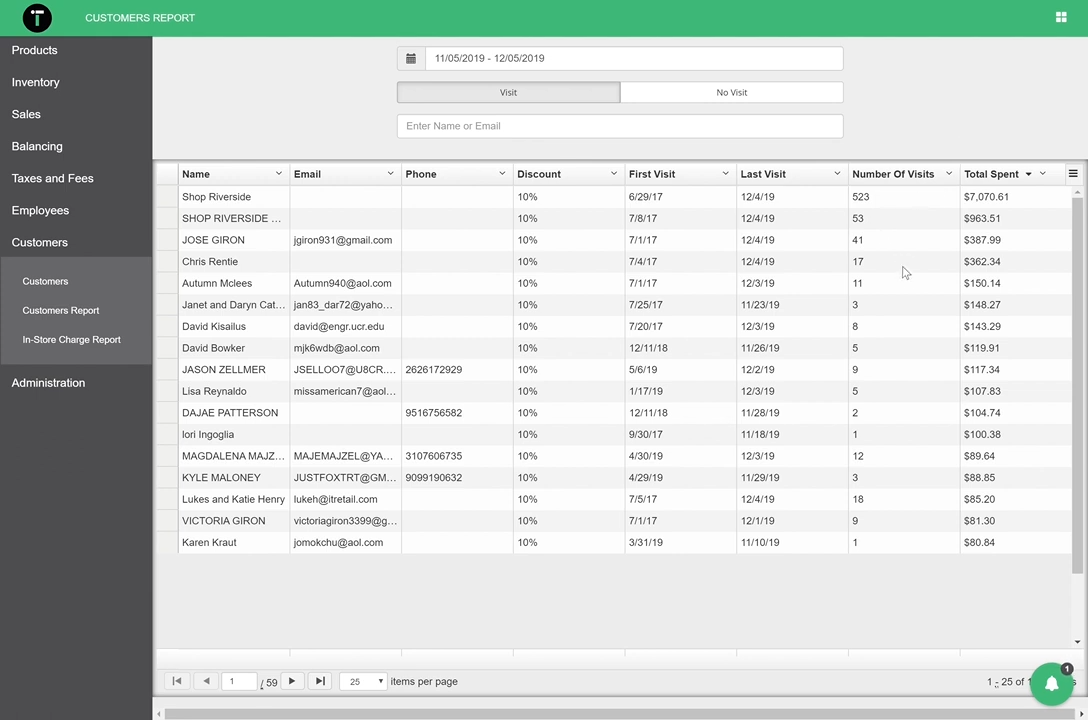
Let’s say your average basket size and ATV have slipped below normal. To lift them, you might launch strategic promotions such as bulk discounts or buy one, get one (BOGO) deals that nudge customers to stock up on their go-to products.
A few days later, see how the promotion did — check first visit, last visit, total spent, and top products to see exactly who responded.
4. Curate Your Product Selection
Your product mix should do more than cover the basics. The right selection keeps regular customers coming back and gives shoppers a reason to try something new.
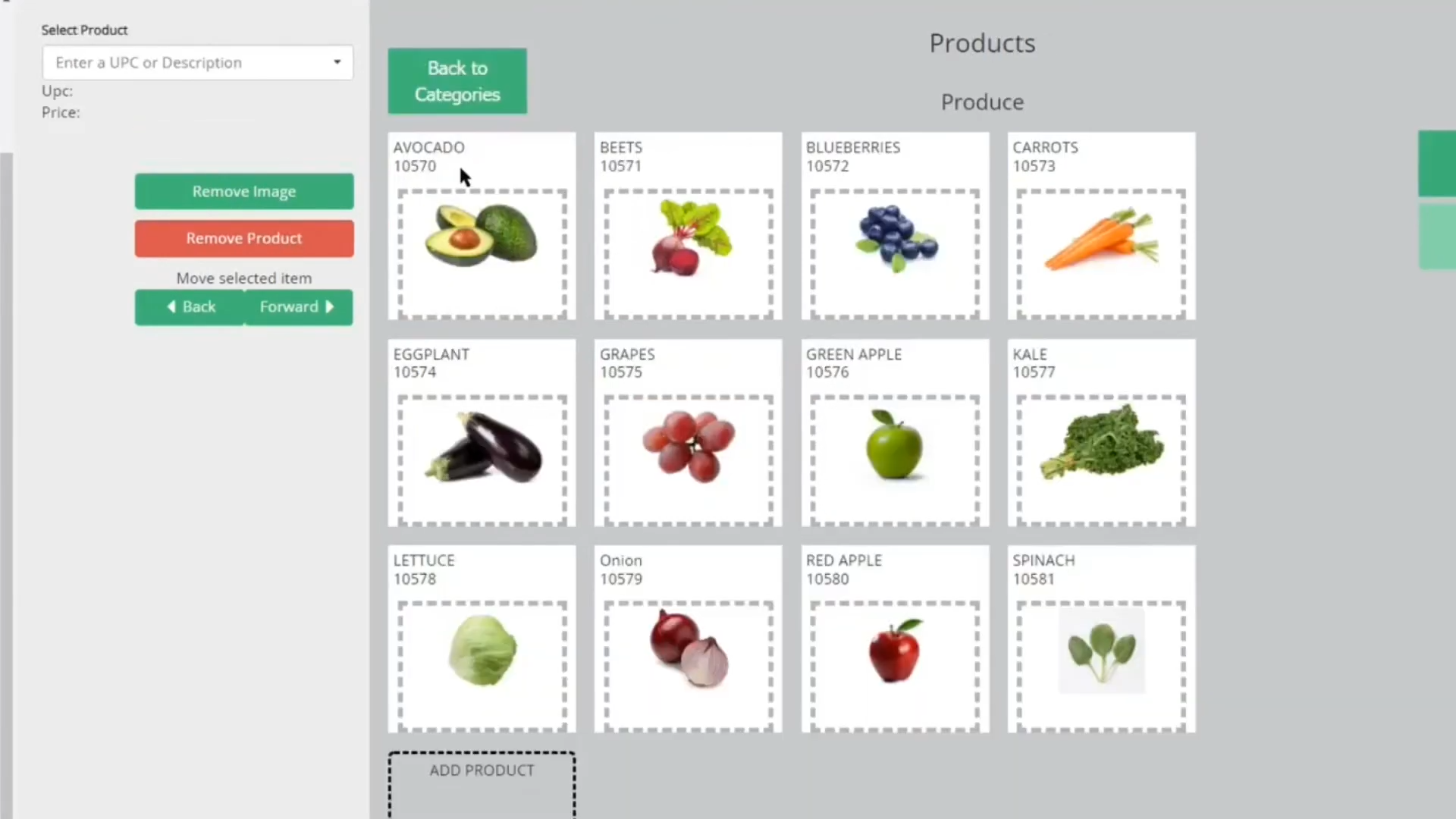
Your POS system can help you understand what's selling, what's slowing down, and how customer preferences change over time. Reviewing product and category sales trends regularly makes it easier to decide which items deserve more shelf space and which ones to cut.
For example, many grocery stores see stronger sales of organic and protein-rich foods during the first few months of the year. If your sales data shows the same pattern, you can expand those categories and give them more visibility while demand is high.
Seasonal buying habits are worth watching, too. Soup and tea sell hard once the weather turns cold, while football season sends chips and beer out the door. Looking back at last year's sales can help you prepare for these shifts and order with greater accuracy.
Related Read: 7 Best Supermarket POS Systems [+ Must-Have Features & Pricing]
5. Rethink Your Store Layout and Product Placement
Your shoppers don't fill their carts from their lists alone. The way you lay out your store and place your products shapes how customers move through the aisles and what they grab along the way.
These metrics help you make sharper merchandising calls:
- Basket analysis shows which products customers buy together. When pasta and pasta sauce keep landing in the same order, put them side by side — or feature one on an endcap — and you'll nudge shoppers toward grabbing both.
- Sales per square foot tells you how hard each department works for the space it takes up. When a section underperforms, that's your cue to reset the products or refresh how you merchandise the area.
- Product and category sales trends show you the payoff from any change you make. Check your numbers before and after you move a product or build an endcap display, and you'll see fast if the change earned its keep.
The goal is a simple one: to help customers find what they came for, and put complementary products where they'll actually notice them. Small placement tweaks add up, and over time they lift your sales and make the trip through your store a better one.
See What Better Data Could Save Your Store
Curious what tighter inventory and less shrink could be worth to your profits? See the numbers in minutes.
6. Let the Data Set Your Prices
Healthy profit starts with knowing the numbers behind every item you sell. Rather than pricing on gut feel, lean on your grocery store's data — what a product costs you and what it actually earns once your shoppers weigh in.
Here are a few metrics worth tracking:
- Cost of goods sold (COGS) shows the true cost of getting a product onto your shelf, including the wholesale price, freight, taxes, and other direct expenses.
- Gross and net profit help you measure overall store performance. Gross profit compares sales to product costs, while net profit also factors in operating costs like payroll and rent.
- Per-product profitability helps identify which items and departments are actually generating profit. A product may sell quickly but still add very little to your profit.
- Price elasticity shows how demand changes when prices move. Everyday staples are highly price-sensitive, while specialty and impulse items can carry a higher price without denting sales — a 10% cut on cereal might drive a real bump, while the same cut on pasta barely moves the needle.
Take your deli, for example. It may generate strong sales but still produce lower-than-expected profits if you’ve priced a few items too low. Looking at profitability by product and department can help you spot where a price adjustment or targeted promotion could make a meaningful difference.
Keep an eye on vendor cost increases, too. When a popular item costs you more but your shelf price stays put, your profit slowly erodes. Features like AI invoicing help here — they read incoming vendor invoices and flag cost changes, so you can update your shelf price before a quiet increase eats into your profit, no line-by-line review required.
7. Improve Your Marketing Strategy
You roll out a discount you're sure is irresistible — BOGO strawberries, 30% off ribeye. Two days later, those items still sit in the cooler, barely touched.
What went wrong? Your promotion doesn't match how your customers actually shop. Generic discounts never perform like targeted, personal offers do.
The best promotions are personal and data-driven. Here are the metrics to keep in mind as you set up discounts or plan new marketing efforts:
- Customer segmentation (often drawn from RFM scores) helps you find customers who shop at certain times or buy certain products, so you can send them personal offers.
- Promotion lift shows how much sales rose during a specific promotion.
- Redemption rate reveals how many customers actually used a discount or loyalty offer.
- Post-promotion sales patterns tell you if a promotion left a lasting mark on sales or customer retention, or just gave away profit.
- Loyalty program metrics show how well your rewards program works — how much members outspend nonmembers, and how often they cash in their perks.
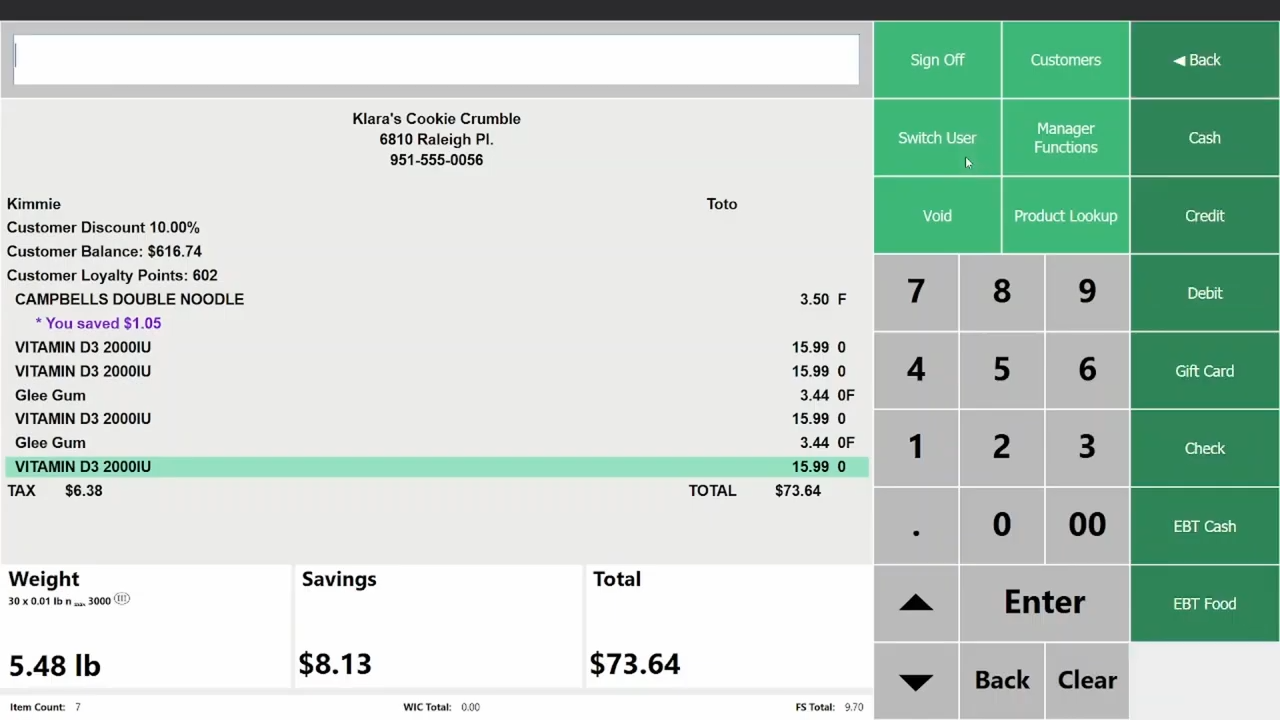
Enroll shoppers and set your point rules, then give members their own pricing and promotions — right from the back office.
Your POS system should make it painless to launch and measure promotions. IT Retail includes a customer loyalty program that handles points, rewards, memberships, and member-only pricing, plus flexible, grocery-specific promotions like mix and match and BOGO, with category-level discounts on top. You get straight out of the box, not as a costly add-on subscription.
Related Read: What Is Customer Segmentation? How To Personalize Marketing at Your Grocery Store
8. Right-Size Your Staffing and Labor
Labor is one of your highest controllable costs — and in an industry where profit is exceptionally thin, overstaffing a slow Tuesday hurts as much as understaffing a Saturday rush. The right data points your schedule at real demand instead of hunches.
Here's what your POS can show you:
- Peak sales times: Your sales reports reveal the hours and days when customers pour in and when the store goes quiet, so you can staff to match the rush instead of the clock.
- Sales by cashier: Because every team member rings up under their own secure login, each sale ties back to whoever rang it — so you can see how a shift went and spot who could use more coaching.
Line up your peak sales times against the schedule, and the fix usually jumps out — add a lane for the after-work rush, trim a shift during the mid-morning lull.
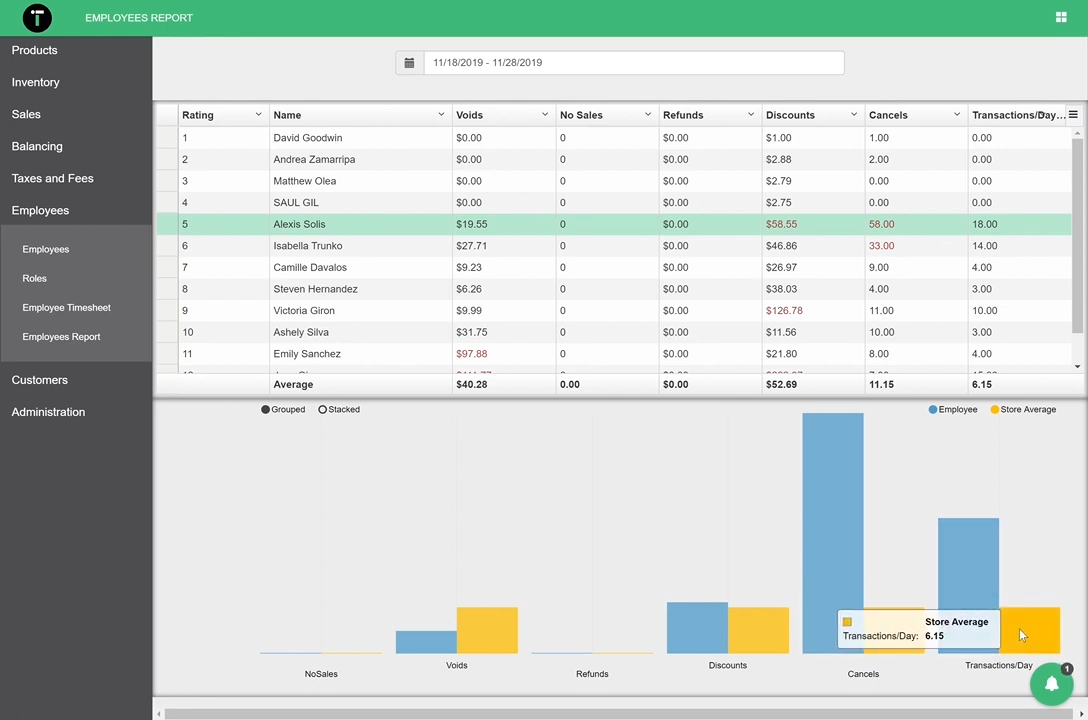
Role-based access keeps things simple as your team grows and turns over. Give each person only the tools their job needs, so a seasonal cashier or your coffee-bar staff can ring up sales without opening your full store reports.
And when a rush hits and you'd rather not add payroll, self-checkout kiosks let customers ring themselves up during your busiest windows.
9. Manage Supplier Performance
Good supplier relationships keep quality products on your shelves at prices you can live with — but with everything else on your plate, it's hard to keep a close eye on every vendor.
Your data makes it easier. Compare the wholesale cost of the same item across the vendors who carry it, and check what you ordered against what actually came off the truck.
One number worth adding to the mix: return on your inventory investment, or GMROI. It shows how much profit you earn for every dollar tied up in a given vendor's stock — a quick way to rank your suppliers by what they really return, rather than by price alone.
Catch the gaps between the order and the delivery early, and you fix them before they cut into your profit. The right POS lets you assign multiple vendors to an item and build purchase orders around your primary vendor, with a substitute ready when you need one. This way, you can compare prices across suppliers and order from the best option on hand instead of leaning on a single provider.
Choose POS Software That Fits Grocery Store Data Analytics
This valuable data sits right at your fingertips — as long as you have the right POS system.
IT Retail is an all-in-one POS solution for grocery stores, and nothing else. Alongside strong reporting and analytics, our software gives you everything you need to:
- Cut stockouts and waste with integrated inventory management and purchase orders.
- Personalize offers and promotions with a loyalty program that comes standard.
- Speed up checkout with secure employee logins and self-checkout kiosks.
- Maintain your target margins with built-in reporting and automatic pricing updates.
- Reduce losses from spoilage, theft, and inventory errors with built-in shrink tracking.
- Stay on top of suppliers with multiple-vendor support and integrated purchase orders.
Because we make it for grocery from the ground up, you get these tools out of the box — not a stack of add-on subscriptions that grow pricier every year. See IT Retail in action by scheduling your live, personalized demo today.

![Grocery Store Liquor Sales [What All Store Owners Need To Know]](https://www.itretail.com/hs-fs/hubfs/_Blog/Blog%20Featured%20Images/IT%20Retail%20Blog/ITR%20BLOG%206.25%20Grocery%20Store%20Liquor%20Sales%20%5BWhat%20All%20Store%20Owners%20Need%20To%20Know%5D%20(1)%20(1).png?width=520&height=294&name=ITR%20BLOG%206.25%20Grocery%20Store%20Liquor%20Sales%20%5BWhat%20All%20Store%20Owners%20Need%20To%20Know%5D%20(1)%20(1).png)
 by Margaret Thacker