




Today’s customers want more than quality products and friendly service. They want convenience, personalization, and a seamless shopping experience.
Failing to keep up with the latest technological innovations can put your store at a significant disadvantage, causing you to lose customers to more tech-savvy competitors. However, the tech that’s available to a corporate giant like Whole Foods or Walmart isn’t the same as a small, family-owned grocery store.
So, what grocery store technology innovations are worth investing in, which are affordable, and, most importantly, which ones are actually worth the hype?
In this article, we’ll go into the top technologies for small grocery stores that can help simplify your workload, improve the customer experience, and boost profits.
Small Grocery Store Challenges: How Tech Fits In
Before diving into the grocery store technology innovations you should consider implementing, it’s worth talking about the specific challenges we want to solve.
While there’s a lot of talk about robotic shelf stockers and smart cart technology, many of those innovations are out of reach or not particularly helpful for small grocery stores.
Major grocery chains’ technology adoption is driven primarily by shareholder profits. Small grocery stores have other priorities, like:
- Financial pressure: Rising inventory prices and cost of living remain a huge challenge in 2026. Small grocers need tools to help them negotiate with suppliers, cut costs, and adjust product mix.
- Profit margins and pricing: Small grocery stores can be slow to adjust pricing, seriously hurting their bottom line. The right technology helps grocers analyze profit margins and make strategic price increases where it matters most.
- Manual admin: Most grocers use manual or outdated technology to track their inventory, write purchase orders (POs), and do other admin tasks. Streamlining these areas makes a huge difference in improving the shopping experience and cutting costs.
- Product mix & corporate competition: Corporate players like Walmart and Costco dominate in discount categories — specialty retailers increasingly compete in customer experience and unique, locally-sourced products.
- Personalization: Personality is one place where small grocers need no technological help. That said, loyalty programs combined with smart customer segments can help grocers tailor their marketing to highlight relevant deals.
- Unique and homemade items: Novel products are a key differentiator for grocery stores, but they’re also much harder to track and sell. Inventory management software for grocery stores helps small businesses efficiently manage the chaos.
In most cases, it’s not the flashiest, most expensive technology that brings the biggest benefits for small businesses. In fact, we recommend making a list of your most pressing challenges so you can figure out which tech upgrades will have the biggest impact for the least money.

8 Grocery Store Technology Innovations Your Store Needs
As a grocery store owner, embracing the right innovations is crucial for cutting costs and meeting changing customer expectations.
While many small grocers’ technology stack is “good enough,” good enough might not be enough to survive. New technology helps store owners:
- Stay competitive: Adopting new technology allows you to meet and exceed customer expectations, helping you differentiate your store from competitors.
- Improve efficiency: Technology can automate tasks and processes, reducing the need for manual work and saving time and resources.
- Enhance customer experience: Implementing technology makes shopping more enjoyable, convenient, and personalized for customers.
- Gather valuable data: Technology allows you to collect and analyze critical data about your customers' shopping habits, profit margins, and bestsellers.
- Adapt to changing consumer habits: As more people adopt digital technologies, offering online shopping, home delivery, and digital payment options becomes essential to meet your customers' evolving needs and preferences.
With those benefits in mind, let's explore five top grocery store technology innovations you can leverage to take your business to the next level.
1. Grocery-Specific Inventory Management Software
Inventory is by far the highest operating expense for most grocery stores. Yet, many stores still rely on spreadsheets or systems that aren’t built to accurately track their inventory costs, update stock levels, and manage product information.
This means many stores are in the dark when it comes to stock levels, profit margins, vendor information, and other metrics that are a must for making improvements.
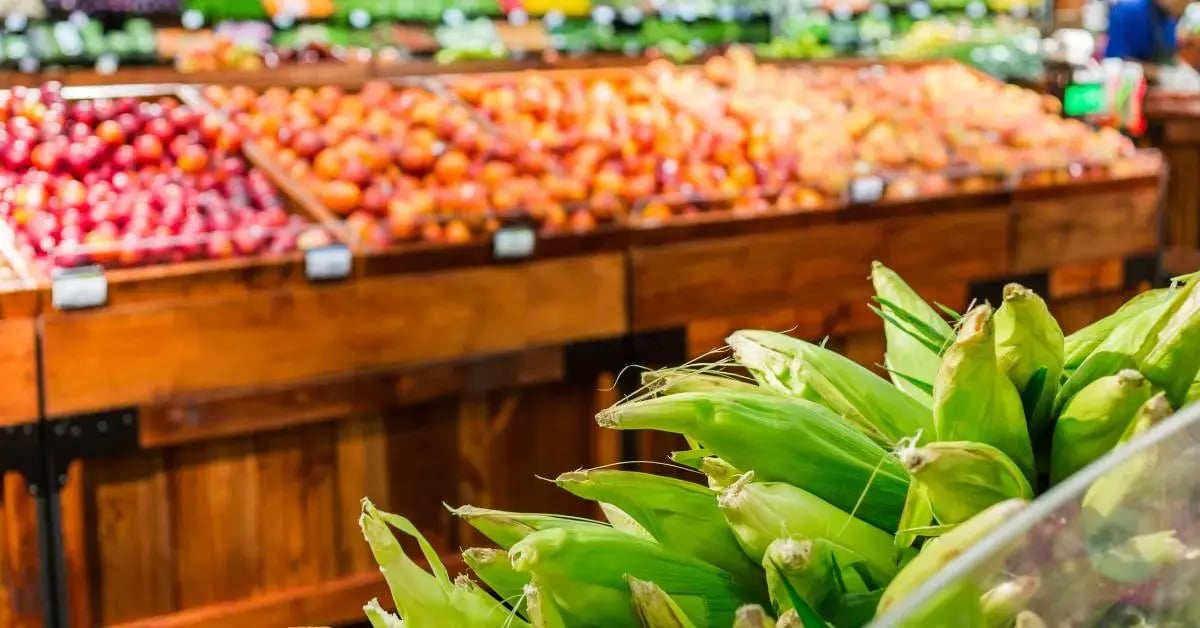
Modern inventory management software is your first step toward controlling costs, understanding which products drive sales (and which waste shelf space), and saving time on manual admin.
But not all inventory management systems are built equally. Many lack the grocery-specific features you need. When updating your inventory management system, look for:
- Unlimited and custom SKUs: Have up-to-date product, cost, and pricing information for anything with a UPC, in addition to digitized product entries for prepared meals, deli items, and anything you make in house.
- Real-time updates: Adjust stock levels in real time every time you make a sale, receive an invoice, or process a refund, so you have an accurate picture of what’s currently in stock.
- Pricing and vendor information: Track wholesale costs so you can quickly calculate prices based on a desired markup. You can track how items from particular vendors are performing overall, too.
- Expiration date tracking: Get better visibility into your perishable inventory without having to physically walk the floor. Plan strategic discounts to avoid food waste and spot departments with unusually high spoilage.
- Weight-based pricing: Price items by the pound and print embedded barcodes to speed up checkout.
- Low-stock reports: Set low-stock thresholds so they appear in low-stock reports automatically when you start to run low.
Keeping an accurate, digital list of inventory is the single most impactful thing you can do to improve your business. It not only makes your work easier, it opens up the ability to analyze your sales data and find areas for improvement.
Pro tip: When implementing a new inventory management system, work with providers that help you move your entire inventory. Having some inventory fully digitized and some still managed manually gives you an incomplete picture of store performance and slows down your cashiers.
2. Grocery Reporting & Analytics Tools
Once your inventory is updated, you’ll have better visibility into your stock. But that added visibility can raise questions about what to do next.
-
You might need to adjust prices, but how much? And for which products?
-
You suspect you’re overordering in your dairy department — but what are the actual spoilage numbers?
-
You can save money by narrowing down the number of SKUs on your shelves, but which ones should stay and which should go?
-
You want to negotiate a new minimum order quantity (MOQ) with your suppliers, but how can you prove to them the change is worth it?
Without an honest view of store performance, it’s nearly impossible to get clear answers. This leads to making pricing or layout changes based on a hunch, not facts.
Grocery store reporting and analytic tools take your sales and inventory data and turn them into insights. Better yet, with the right POS system, you don’t need to do anything special to start collecting data.
Every time you make a sale, clock in an employee, or receive an invoice, your POS system generates data to use in detailed reports. These can be used to understand your:
- Overall sales and profit margins
- Bestselling items and product categories
- Profit margins by department
- Spoilage and food waste sources
- Inventory movement and dead stock
- Promotion and sale performance
- Peak hours
- Supplier profit margins and lead time
This information helps you make more confident business decisions and answer the most pressing questions about your grocery store.
Related Read: 10 Key Performance Indicators for Grocery Stores
3. Electronic Shelf Labels
One of the major issues we see time and again with small grocery stores is a reluctance to adjust pricing. Part of it comes from a lack of visibility (something modern inventory management systems address). Another major factor is the effort required to change all of the shelf labels and signage in your store.
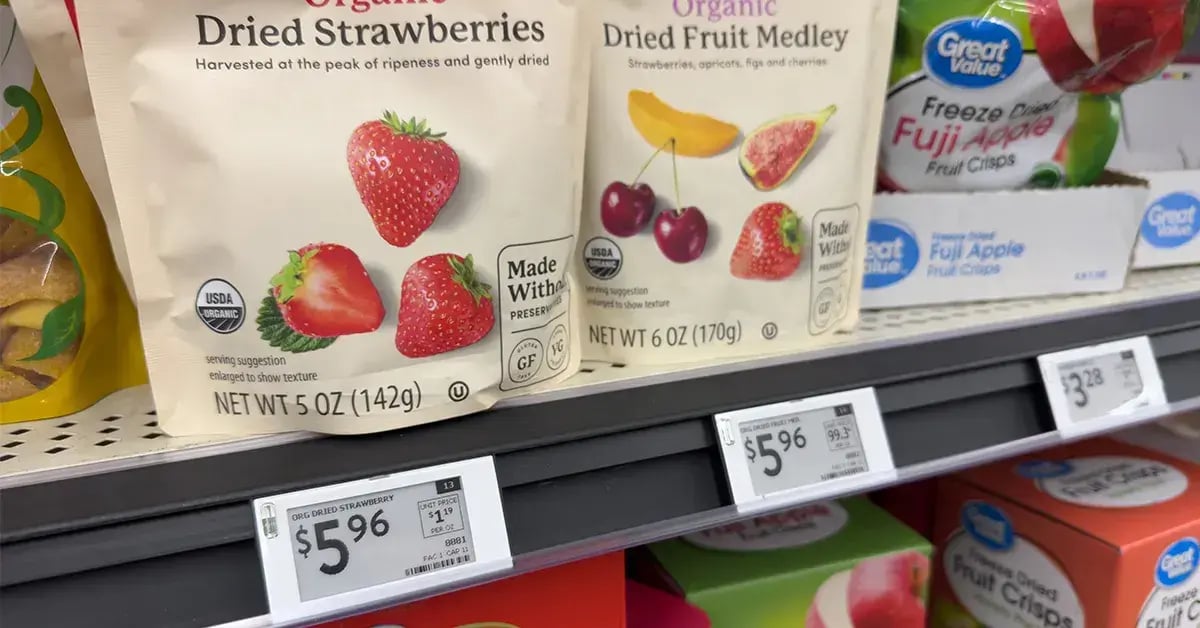
Electronic shelf labels (ESLs) are wireless displays that connect directly to your point of sale (POS) system, allowing you to update prices instantly. This gives small grocers a better way to quickly adjust prices based on seasonality and market changes.
On a more practical level, it means your employees don’t need to manually change out shelf labels. This reduces labor costs and frees up time to be spent on stocking, food prep, and other more mission-critical tasks.
|
A word of caution: ESLs can technically be used to implement demand-based pricing (e.g., adjusting prices throughout the day based on peak hours and other factors) — but it might not be worth it. Some customers see it as price gouging, causing some states to take legal action against the practice. Long story short, dynamic pricing might seem interesting, but it might rub customers the wrong way. |
4. Combined Touchscreen & Self-Checkout Systems
Self-checkout is commonplace in many stores, but it isn’t the must-have technology it once was. Some customers are pushing back against self-checkout, and major retailers are reducing the number of self-checkout lanes in their stores.
So, what have small grocery stores learned?
- Self-checkout isn’t a replacement for cashiers and traditional checkout lanes — especially if you don’t have the staff to manage them effectively.
- Standalone self-checkout lanes are expensive and aren’t always ideal for smaller stores.
However, some systems, likeIT Retail, have more flexible ways to implement self-checkout — including the ability to take a standard cashier touchscreen and turn it into a self-checkout station just by changing the user interface.
There’s no definitive answer when it comes to self-checkout vs. traditional cashiers. It depends on your business and your customers. But flexible touchscreen options allow smaller stores to try out self-checkout without investing in brand-new hardware.
5. AI-Powered Productivity Tools
Many corporate chains are leaning into chat-based AI to market to customers — but this isn’t necessarily a good fit for independent grocery stores that thrive on person-to-person connection.
Instead, we recommend focusing on AI tools that streamline your back office tasks. One of the main ways grocery stores can use AI is through smart productivity tools. These include features like:
- Smart scanning invoices: Scan a PDF or use a picture of a paper invoice to update your inventory, eliminating hours of manual admin work.
- Missing item reports: Get a consolidated list of items that didn’t scan at checkout, get smart product suggestions based on the barcode, and then update stock entries.
In the future, keep an eye out for AI-assisted inventory management tools that help fine-tune your low-stock thresholds, spot seasonal trends, and suggest optimal price points.
When considering AI tools generally, look for ones that help your employees as opposed to ones that replace them. Many customers love the personal connection that comes from a small business, and AI-based checkout or marketing might be a turnoff.
6. Smart Scales & Custom Labels
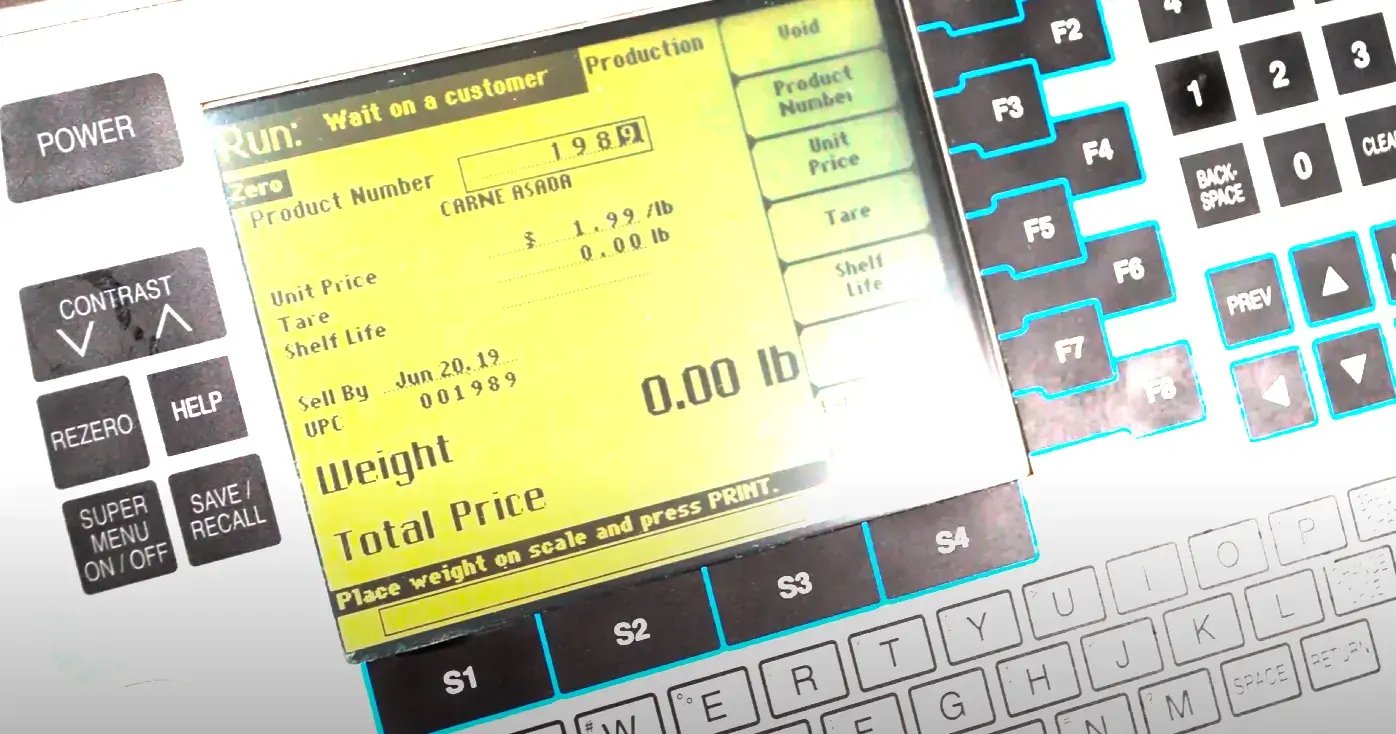
Many stores still manually look up product information or use a calculator to sell their weight-based items. While not the most cutting-edge technology on this list, integrated scales and label printers make inventory tracking and checkout run considerably smoother.
Most grocery stores sell variable weight items (e.g., produce, deli meat, ground beef). An integrated scale allows you to look up items in your system, weigh them, and then print a label with an embedded barcode.
This improves checkout accuracy and lets you track the number of variable weight items you’ve sold. Most importantly, labels and barcodes are much more convenient for customers.
A win-win for your staff and customers.
7. E-Commerce Integrations
Online shopping is second nature for most people. When it comes to online grocery sales, corporate chains are pulling ahead of Main Street stores. This isn’t a huge surprise — they have a lot more money to spend on sleek spaces and last-mile logistics.
You might not be able to do everything a huge corporate store is able to do, but having even some online shopping options can help your brand stay competitive.
E-commerce integrations on your POS system open up new possibilities for your store, including:
- Listing your selection online, so even in-person shoppers can see what’s in stock before they visit
- Connecting your store with third-party services like InstaCart and Mercato
- Setting up a web store for local deliveries and curbside pickup
A POS system lets you set separate prices for items you sell online, helping you recoup delivery and service fees. You can also use your reports to see which types of items online shoppers prefer, so you can come up with more effective online promotions.
8. Loyalty Programs & Customer Segments
A new customer is great. A returning customer is even better. Repeat customers spend 67% more than new ones and are seven times more likely to try new offerings. Older customers are also a key driver of referrals and reviews, which are essential to helping you establish yourself in the community.
If you don’t have a customer loyalty program already, now’s the time to set one up. Customer loyalty programs encourage repeat business by letting customers earn points on purchases, get access to exclusive discounts, or a mix of both.
Loyalty programs encourage customers to stick with your store over the competition. Better yet, most loyalty programs can be managed right from your POS system and usually only require a customer’s name and phone number to sign up.
Once you have a customers’ contact information, you can start to track their purchase history. This lets you see which products and departments are most popular with your best customers — and crucially, it gives you the tools to create customer segments.
Based on customer sales history, you can create segments like:
- Lunch lovers (customers who frequently buy prepared meals at lunch)
- Bulk shoppers (customers with an average basket size of $100 or more)
- Snackers (customers who bought chips or other snacks in the last week)
When you send out communications about deals or promotions, you can use these segments to personalize your marketing (e.g., sending meal deal coupons to your lunch lovers, 15% off any purchase over $100 for your bulk shoppers, or a mix and match snack deal for your snackers).
Get the Grocery Store Technology Innovations That Matter Most for Small Businesses
Staying efficient and responsive to customer needs is essential to your grocery store’s success. Embracing new technologies helps you better serve your customers, save time on admin, and stay ahead of the curve.
While trying new technologies may seem daunting, you don't have to dive in headfirst. Start small by testing these innovations on a limited scale, such as in a single department or with a select group of customers. This approach allows you to evaluate the impact of each technology before committing to a full-store deployment.
A robust POS system is one of the most critical pieces of technology to implement in your store. IT Retail offers customizable point of sale systems specifically built for grocery stores and markets.
Every store is different, and not every store is ready to implement all the latest technologies at once. Check out our flexible pricing tiers to find the right hardware and software combination for your business.

![How Does the Supermarket Supply Chain Work? [+How Your Store Can Adapt]](https://www.itretail.com/hs-fs/hubfs/Blog%20Featured%20Images/IT%20Retail%20Blog/How%20Does%20the%20Supermarket%20Supply%20Chain%20Work%20-%20BLOG.webp?width=520&height=294&name=How%20Does%20the%20Supermarket%20Supply%20Chain%20Work%20-%20BLOG.webp)
 by Margaret Thacker