




The Supplemental Nutrition Assistance Program (SNAP) helps nearly 42 million Americans each month — about one in eight U.S. households.
Through this program, participants receive monthly funds they can spend on eligible grocery items using an EBT card at approved retailers.
If your POS can’t process EBT payments, you shut out a large group of shoppers who depend on stores that accept those benefits.
This article breaks down how grocery POS systems handle EBT transactions, SNAP rules, and dual pricing — including what happens at checkout, how systems separate eligible and non-eligible items, and how stores keep transactions compliant without adding extra work for cashiers.
What’s the Difference Between EBT, SNAP, and Dual Pricing?
Millions of Americans use SNAP benefits each month, and participation has remained consistently high for years — which means grocery stores across the country ring up SNAP-funded purchases every day.
But what exactly is the difference between SNAP and EBT? And how does dual pricing fit into the mix?
Here’s a quick breakdown of each and why it matters for your store.
| Term | What it is | What shoppers can pay for | What your POS must handle | Why stores offer it |
|---|---|---|---|---|
| SNAP | Federal food assistance program | Eligible grocery items, seeds, plants | Item eligibility enforcement, reporting, tax handling | Expands customer base, drives repeat visits |
| EBT | Payment card system delivering SNAP and sometimes cash assistance | SNAP groceries plus broader purchases if EBT Cash applies | Split baskets, tender routing, balance checks | Allows stores to accept SNAP benefits |
| Dual pricing | Pricing structure showing cash price vs card price | Any items depending on payment method | Price display logic, receipt clarity, terminal prompts | Offsets card processing costs |
In short, SNAP sets the rules for what can be purchased, EBT is the card shoppers use to actually pay for those items, and dual pricing controls how prices appear based on payment type.
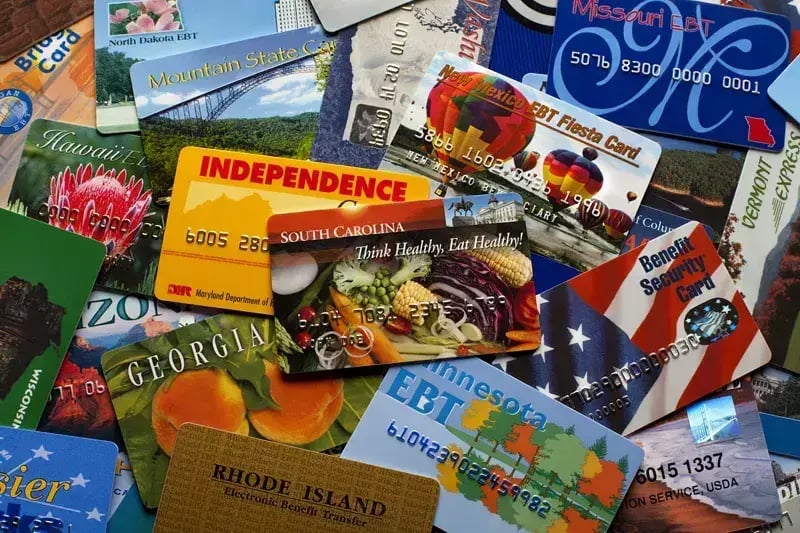
(Image source: SNAP-Ed Connection, U.S. Department of Agriculture)
EBT cards may look different across states, since each state issues its own design and sometimes its own name (e.g., Lone Star Card in Texas, QUEST Card in Arizona). However, shoppers can still use their card at any SNAP-authorized retailer nationwide.
Related Read: Improve Grocery Store Payment Processing With These 5 Tools
Notably, stores that support EBT and SNAP don’t receive less money per item — they’re simply accepting another payment method. In fact, many retailers actually see higher basket counts after they start accepting SNAP.
Together, these tools help grocery stores serve more shoppers while protecting revenue.
EBT Cash vs. EBT Food
Many grocers get tripped up distinguishing EBT Food (SNAP) from EBT Cash. Both benefits are issued to the same EBT card, but they serve different purposes and have different rules.
Here’s what you need to know.
| Feature | EBT Food (SNAP) | EBT Cash ( TANF / Cash Assistance ) |
|---|---|---|
| Purpose | Purchase nutritious food | Pay for basic necessities like rent, utilities, clothing, and non-food items |
| Funding | Federally funded | State administered (often via TANF) |
| Where it can be used | Grocery stores, farmers markets | Stores, ATMs, online retailers (varies by state) |
| Allowed purchases | Produce, meat, dairy, packaged groceries, seeds/plants for food production | Non-food items (toiletries, diapers, clothing, household essentials); can withdraw cash at ATMs |
| Restrictions | No hot foods, alcohol, tobacco, pet food | Some states restrict use at liquor stores, casinos, or adult entertainment venues |
| Cash access | Not allowed | Allowed (ATMs, cash-back at registers) |
In summary, shoppers paying with EBT Food (i.e., SNAP) can only cover eligible grocery items, whereas those using EBT Cash can cover a broader range of items depending on state rules.
The same card can carry both balances, and your POS system routes each type correctly at checkout.

What Checkout Actually Looks Like With EBT + Dual Pricing
Once your store starts accepting EBT card payments, let's walk through what actually happens at the register.
1. Cart Scanning and Item Sorting
As cashiers scan items, your POS system:
- Flags SNAP-eligible items
- Flags non-eligible items (alcohol, tobacco, hot foods, paper goods)
- Builds a split basket automatically
Cashiers don’t memorize complex eligibility rules — the system handles that for you.
2. Tender Selection and Card Prompt
When customers insert or tap an EBT card:
- Terminal requests PIN entry.
- POS applies funds to eligible items first.
- Remaining balance stays visible on screen.
The USDA sets SNAP transaction rules, including eligible items, split-tender handling, and sales tax exemptions. Your POS software needs to enforce these rules automatically at checkout to keep every transaction compliant.
3. Split Tender Handling
If non-eligible items remain in the basket:
- POS prompts for another payment method.
- The customer pays the remaining balance with debit, credit, or cash.
- The receipt clearly separates payment types.
This process helps prevent checkout confusion and reduces cashier training time.
4. Sales Tax Handling
Your POS system should remove tax from SNAP-eligible items automatically when shoppers pay with EBT Food. Cashiers don’t have to manually adjust taxes at checkout.
5. Dual Pricing at Checkout
If a store runs dual pricing:
- The terminal shows both cash and card prices.
- The customer chooses a payment method.
- POS applies the correct price instantly.
EBT transactions follow SNAP pricing rules, not card-fee pricing structures.
How Dual Pricing Works in Grocery Checkout
Dual pricing typically works as a cash discount — there’s a standard card price, and cash payments get a lower price. Many states allow dual pricing since it presents cash savings as a discount, rather than a surcharge.
To handle this, your POS must show both prices, display differences on receipts, and prompt staff when the payment method affects the total. This process helps prevent confusion and keeps all transactions compliant, regardless of payment type.
Related Read: 5 Ways To Boost Sales With a Grocery POS System [+ 4 Top Providers]
Dual pricing also interacts with other important grocery workflows. Your POS must correctly apply prices to scale items at produce, deli, and meat counters, and ensure any promotions or sales still comply with SNAP eligibility rules.
Frequently Asked Questions (FAQs)
Running EBT, SNAP, and dual pricing in 2026 can raise a lot of practical questions.
Below, we answer some common queries about what shoppers can buy, how transactions work at checkout, and how POS systems handle multiple payment types.
1. Which grocery items are eligible for SNAP?
- SNAP benefits can only cover certain food items like fruits, vegetables, dairy, meat, and packaged groceries.
- Items the program does not cover include alcohol, hot foods, household supplies, and other non-food items.
- The POS system automatically blocks ineligible items when shoppers use EBT Food, keeping checkout compliant.
2. Can stores accept EBT for online grocery orders?
- Yes. Federally approved online grocery retailers can accept EBT for SNAP-eligible groceries.
- Grocery POS systems integrate inventory, online orders, and EBT processing so shoppers can pay correctly without manual adjustments.
3. How do grocery stores handle partial EBT payments?
- Modern POS systems support split tenders.
- For example, if a customer’s EBT Food balance doesn’t cover all eligible items or they also buy non-eligible items, the POS applies the EBT funds first and prompts for another payment method for the remainder.
4. How do POS systems handle dual pricing with EBT transactions?
- Dual pricing (also known as cash discounting) only applies to credit/debit card payments. EBT transactions follow SNAP rules, meaning the card price isn’t affected.
- POS terminals display cash vs. card prices clearly to avoid incorrectly charging shoppers using EBT.
5. Are EBT Cash and EBT Food accepted for the same items at checkout?
- Not always. EBT Food is restricted to SNAP-eligible groceries, while EBT Cash (often linked to TANF or state programs) can cover a wider range of items depending on state rules.
- POS systems route each benefit type to the correct items automatically.
For any other SNAP or EBT-related questions that go beyond your POS system, contact your state’s SNAP office or local Department of Social Services. They can clarify rules around eligible items, EBT Cash programs, and any local restrictions that may affect your store.
Making EBT, SNAP, and Dual Pricing Work for Your Store
Accepting SNAP and EBT payments alongside dual pricing is a win-win — it gives shoppers more payment options while keeping checkout accurate and supporting higher transaction volumes.
But to accept these funds effectively, you need a POS system that handles them correctly.
IT Retail includes built-in EBT/SNAP processing, supports dual pricing, and automatically manages eligibility checks, split tenders, and sales tax adjustments. Every payment connects to one unified platform to make compliance and reporting easy, while keeping checkout fast and accurate for your cashiers.
And that’s just one of the ways that IT Retail supports your store. Build your perfect POS setup to start accepting more payment types and serving more customers, all while keeping checkout easy for every cashier.

![7 Best Supermarket POS Systems [+ Must-Have Features & Pricing]](https://www.itretail.com/hs-fs/hubfs/ITR%20BLOG%20REFRESH%20717%20X%20Best%20%20Supermarket%20POS%20Systems%20%5B+%20Must-Have%20Features%20%26%20Pricing%5D.png?width=520&height=294&name=ITR%20BLOG%20REFRESH%20717%20X%20Best%20%20Supermarket%20POS%20Systems%20%5B+%20Must-Have%20Features%20%26%20Pricing%5D.png)